
Download Beaver Notes – Efficient Document Management for Mac
Overview
Beaver Notes is a free, lightweight document‑management application built exclusively for macOS. Designed with a clean, minimalist interface, it lets both casual users and power professionals create, organize, and retrieve notes without the clutter that typically accompanies traditional note‑taking apps. By focusing on speed and simplicity, Beaver Notes removes the friction of managing multiple file types and folders, allowing you to keep ideas, meeting minutes, research snippets, and project outlines all in one secure location.
The app supports rich‑text, markdown, PDF, image attachments, and even simple spreadsheet embeds, giving you the flexibility to store virtually any type of information you need for personal or business use. Because it’s a native Mac app, it integrates seamlessly with macOS features such as Spotlight search, Dark Mode, and the system’s native file‑sharing services. Whether you’re a student juggling lecture notes, a freelancer tracking client briefs, or a corporate team looking for a straightforward knowledge‑base tool, Beaver Notes offers a streamlined workflow that encourages productivity while keeping your digital workspace tidy.
Its free licensing model means you can download, install, and start organizing your documents right away—no hidden fees, no subscription traps, just a secure, regularly updated tool that respects your privacy.
Key Features & How to Get Started
Feature List
- Unlimited note creation with tag‑based categorization.
- Support for rich‑text, markdown, PDF, images, and embedded tables.
- Instant full‑text search powered by macOS Spotlight.
- Drag‑and‑drop organization with collapsible folders.
- Dark Mode compatibility for low‑light environments.
- Secure local storage with optional iCloud sync.
- Customizable keyboard shortcuts for rapid entry.
- Export notes to PDF, TXT, or markdown formats.
- Auto‑save and version history to recover previous edits.
- Free updates delivered through the Mac App Store.
Installation & Usage Instructions
Getting Beaver Notes up and running takes just a few minutes. First, visit the official Beaver Notes page on the Mac App Store or download the .dmg file directly from the developer’s website. After the download completes, double‑click the .dmg file and drag the Beaver Notes icon into your Applications folder. macOS may prompt you to confirm that you want to open an app from an unidentified developer; simply click “Open” after verifying the source. Once installed, launch Beaver Notes from Launchpad or the Applications directory.
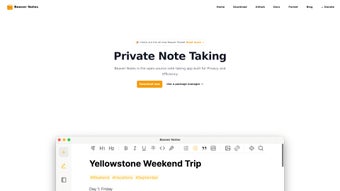
Upon first launch, you’ll be greeted by a short onboarding wizard that guides you through basic setup: choose a default storage location (local or iCloud), select a preferred theme (Light or Dark), and optionally import existing notes from other apps such as Apple Notes or Evernote. After the wizard, the main workspace appears with a left‑hand sidebar for folders and tags, and a central pane for note editing. To create a new note, click the “+” button in the toolbar or use the shortcut ⌘ N.
You can then type directly, apply formatting via the toolbar, or paste content from other sources. Tags are added by typing “#” followed by the tag name, making it easy to filter notes later. The search bar at the top instantly filters results as you type, leveraging Spotlight indexing for lightning‑fast retrieval.
For regular backups, enable the iCloud sync toggle in the Settings menu; this ensures your notes are safely stored across all your Apple devices.
Compatibility, Pros & Cons
Compatible with macOS 10.13 (High Sierra) and later, including macOS Ventura and macOS Sonoma.
Pros
- Completely free with no hidden subscription fees.
- Native macOS performance; no lag even with thousands of notes.
- Intuitive UI that reduces the learning curve for new users.
- Robust search powered by Spotlight for instant results.
- Flexible file format support—ideal for mixed‑media documentation.
- Dark Mode and system‑wide accessibility compliance.
- Secure local storage plus optional iCloud sync for cross‑device continuity.
Cons
- Currently available only for macOS; no Windows, Android, or iOS version.
- Lacks advanced collaboration features such as real‑time sharing.
- No built‑in encryption beyond macOS file‑system protection.
- Limited third‑party integrations compared with larger note platforms.
- Export options are basic; no direct integration with cloud services like Google Drive.
Overall Rating: 4.5/5 – Beaver Notes delivers a polished, free solution for Mac users who need a reliable way to capture and organize their ideas without the overhead of subscription‑based services.
FAQ & Conclusion
Is Beaver Notes truly free, or are there hidden costs?
Beaver Notes is 100 % free. All core features, including unlimited notes, tagging, and iCloud sync, are available without any subscription or in‑app purchases. Updates are delivered at no cost through the Mac App Store.
Can I import notes from other applications?
Yes. During the first‑run wizard, Beaver Notes offers an import option for Apple Notes, Evernote, and plain‑text files. You can also drag‑and‑drop files directly into the app after installation.
How does Beaver Notes handle data privacy?
All notes are stored locally on your Mac unless you enable iCloud sync. The app does not collect usage analytics or send your data to third‑party servers, ensuring your information stays private.
Is there a way to back up my notes automatically?
When you enable iCloud sync, your notes are automatically backed up to Apple’s cloud service. For local backups, simply copy the “Beaver Notes” folder from your Documents directory to an external drive or Time Machine backup.
Will Beaver Notes work on older Macs running macOS High Sierra?
The minimum supported version is macOS 10.13 (High Sierra). If your Mac runs this version or any newer release, Beaver Notes will install and run without issues.
Conclusion – Boost Your Productivity Today
If you’re searching for a fast, free, and secure way to keep your notes organized on a Mac, Beaver Notes checks every box. Its native performance, intuitive tagging system, and deep integration with macOS make it a standout choice in the crowded business‑productivity space. While it currently lacks cross‑platform support and advanced collaboration tools, the core experience is solid enough for individuals and small teams who value simplicity over feature bloat. Download Beaver Notes now, set up your first notebook in minutes, and enjoy a clutter‑free workspace that lets you focus on what matters most—your ideas and projects.
Click here to download Beaver Notes for free and start organizing your documents instantly.







